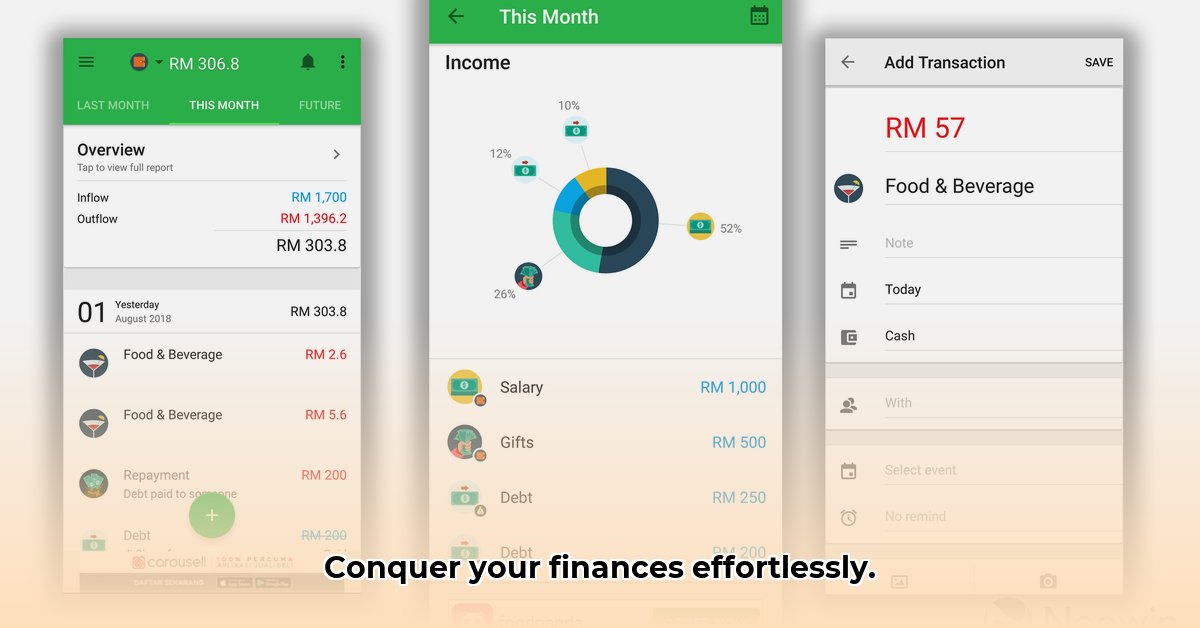
Mastering your personal finances doesn't have to be a struggle. Money Lover offers a user-friendly approach to effortless budgeting, designed for everyone, regardless of experience. This detailed review and instructional guide will explore its features, assess its strengths and weaknesses, and help you decide if it's the right financial management tool for you.
Getting Started: Your First Steps with Money Lover
Downloading Money Lover is straightforward: simply download it from your phone's app store (Google Play or Apple App Store). The initial setup is equally simple, requiring only basic personal information. Linking your bank accounts is optional but dramatically streamlines the process by automatically importing transactions. Manual entry remains a viable alternative for those preferring greater control or who are hesitant to link bank accounts directly. The app’s intuitive design eases the manual entry process, making it accessible even to non-tech-savvy users. Isn't it great to have several convenient options available?
Exploring Money Lover's Key Features: Your Financial Toolkit
Money Lover goes beyond simple tracking; it actively supports financial management. Key features include:
- Effortless Expense Tracking: Record, categorize (groceries, entertainment, etc.), and visually monitor your spending. This provides invaluable insight into your spending habits.
- Budgeting Made Easy: Set monthly spending limits, and the app will immediately show if you're on track.
- Conquering Debt: Track debts, schedule payments, and monitor progress. Provides structure and motivation during debt repayment.
- Achieving Your Savings Goals: Set savings targets, and the app actively tracks your progress.
- Multi-Device Syncing: Access your financial information across multiple devices (phone, tablet, computer).
Weighing the Pros and Cons: A Balanced Perspective
Money Lover, like all apps, presents advantages and disadvantages.
Pros:
- Intuitive Interface: User-friendly, even for beginners. Quick and easy setup.
- Comprehensive Features: Covers most aspects of personal finance management.
- Cross-Platform Compatibility: Access information across multiple devices.
- High User Satisfaction: Consistently receives positive user reviews.
Cons:
- Limited AI/ML Capabilities: Less sophisticated AI and machine learning than some competitors, limiting predictive capabilities.
- Premium Features: Some advanced features require a paid subscription.
- No Built-in Investment Tracking: Lacks investment tracking features.
- Competitive Market: Operates within a saturated market with strong competitors.
How Money Lover Stacks Up Against the Competition
While competitors like Mint or Personal Capital sometimes offer more advanced AI and investment tracking, Money Lover prioritizes simplicity and ease of use. This makes it ideal for those prioritizing user-friendliness. It’s arguably the best option for budgeting beginners seeking a straightforward approach. Do you value simplicity or advanced features?
User Experience and Value: Is it Worth It?
Money Lover’s user experience is generally positive, thanks to its clean design. While the free version is solid, the premium version unlocks additional features. The premium subscription's value depends on individual needs and whether the advanced features justify the cost. Carefully consider which features you truly need.
Actionable Steps for Mastering Money Lover
- Start with the Basics: Begin with the core free features – expense tracking and budgeting.
- Assess Your Needs: Upgrade to premium only if necessary.
- Stay Consistent: Regularly review and adjust your budget.
- Explore Further: Keep up with app updates and new features.
Money Lover is a strong contender in the personal finance app market. Its simplicity makes it a powerful tool, especially for those seeking a straightforward approach. The best app ultimately depends on individual needs and preferences. Remember that financial tools should empower, not overwhelm.
How to Improve Money Lover App Budgeting Features Using AI
Key Takeaways:
- Money Lover's effectiveness hinges on consistent user engagement.
- The free version is limited; the premium version's value needs careful consideration.
- Data security requires independent verification.
- AI integration is crucial for future development, offering personalized budgeting advice, predictive spending patterns, and proactive financial management.
Exploring AI Integration for Enhanced Budgeting
AI could revolutionize Money Lover by offering predictive spending analysis, personalized budgeting recommendations, and automated transaction categorization. This would save time, improve accuracy, and enhance financial management.
A Comparative Glance at Competitors
Money Lover faces competition from apps with more sophisticated AI. Compare features and prices before making a decision.
Practical Tips for Optimizing Money Lover
- Maintain consistent transaction updates.
- Evaluate premium features' value.
- Explore third-party integrations.
- Provide user feedback to the developers.
Addressing Security Concerns
Prioritize apps with strong data security and privacy measures; independent verification is recommended.
⭐⭐⭐⭐☆ (4.8)
Download via Link 1
Download via Link 2
Last updated: Saturday, May 10, 2025